Title here
Summary here


Four gigabit ports driven by Alex Forencich's Taxi MAC, with no IP license
October 21, 202612 minutes
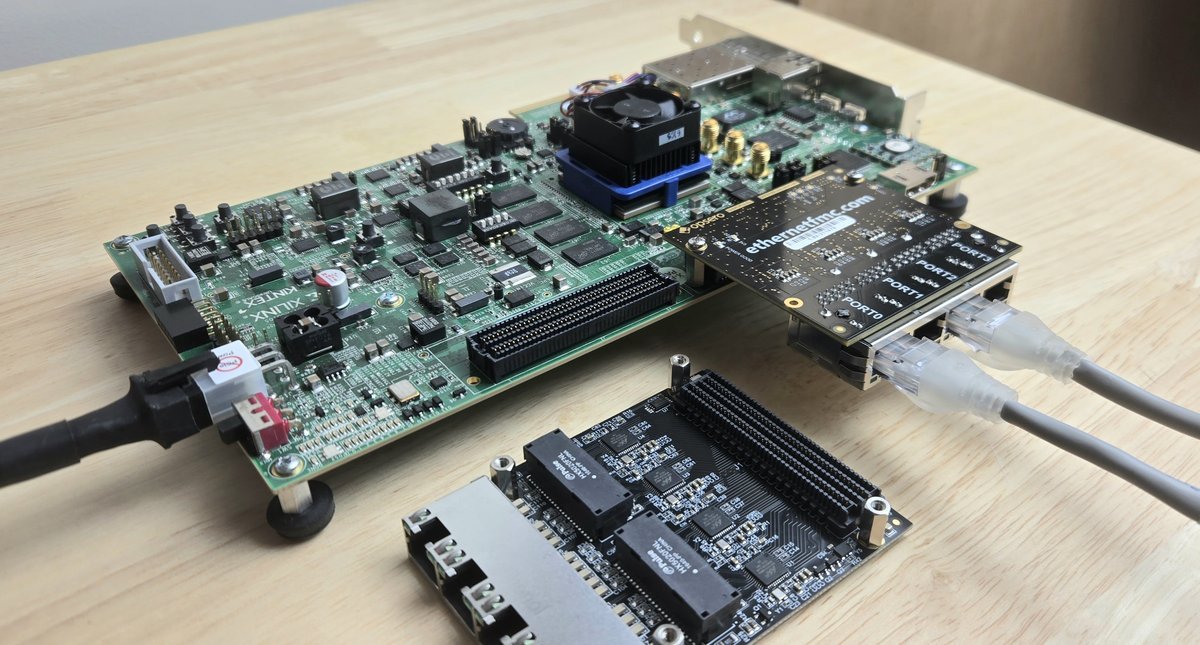
In this post I’m going to introduce a reference design that I’ve wanted to have for a long time: the Ethernet FMC driven by a fully open-source Ethernet MAC. The design is called ethernet-fmc-taxi-eth, and it gives you four independent gigabit Ethernet ports, each one built from the 1G RGMII MAC of the Taxi transport library, written by Alex Forencich. There’s no AXI Ethernet Subsystem in the design, so no separately-licensed AMD IP is needed to build it, and the source of the MAC sits right there in the repository for you to read, simulate and modify.
The Ethernet FMC is really the product that got Opsero off the ground. Gigabit Ethernet is just so useful: the cables are everywhere, the throughput is enough for a huge range of applications, and FPGAs are particularly good at processing Ethernet packets efficiently, right there in the fabric as they come off the wire. For most of the last decade, our two main reference designs for this card have been ethernet-fmc-axi-eth, built on the AMD AXI 1G/2.5G Ethernet Subsystem, and ethernet-fmc-zynq-gem, which uses the hard Gigabit Ethernet MACs (GEMs) in the processing system of the Zynq and Zynq UltraScale+. Both work well, but over the years many people have asked me “can I use the Ethernet FMC with an open-source MAC?”. The answer was always “yes, of course”, but I never had a reference design that I could point them to. This is that design.
This post covers what the design does, the boards it supports, how it compares with our other Ethernet FMC designs, and the licensing you need to know about. For the fine detail (register map, timing constraints, driver internals) see the user guide and the repo README.
Before getting into the design, I want to give credit where it’s due. The MAC in this design was written by Alex Forencich, and if you’ve been working with FPGAs and Ethernet or PCI Express for any length of time, there’s a good chance you’ve already used some of his code. Alex has made enormous contributions to open-source FPGA development, especially in the areas of Ethernet and PCIe:
I’m not the only one who thinks highly of this work. Over the years, many of our customers, partners and contacts in the FPGA space have told me how much they rate Alex’s code, and how it saved them on a project. So if you find this reference design useful, please go and have a look at the Taxi documentation, star the repos, join the Corundum/Taxi community Zulip, and if you’re shipping a product, consider a commercial license from FPGA Ninja (more on that below). License fees support the continued development of these projects.
Our AXI Ethernet and PS GEM designs aren’t going anywhere, but there are some good reasons to want an open-source MAC:
Each of the four ports of the Ethernet FMC gets a taxi_rgmii_mac_N block, which is a block design
module reference wrapping three things: the Taxi 1G RGMII MAC with its frame FIFOs
(taxi_eth_mac_1g_rgmii_fifo), a Taxi MDIO master for the port’s PHY, and a small AXI-Lite
register file for control, status, statistics counters and MDIO access. Frames move between the
MAC and system memory through an AMD AXI DMA per port (scatter-gather, 32-bit AXI-Stream; MM2S is
transmit and S2MM is receive). The block diagram below shows the whole thing: the processor and DDR
on the left, the four AXI DMA and Taxi MAC pairs with their RGMII I/O in the middle, and the four
Marvell 88E1510 PHYs of the Ethernet FMC on the right.
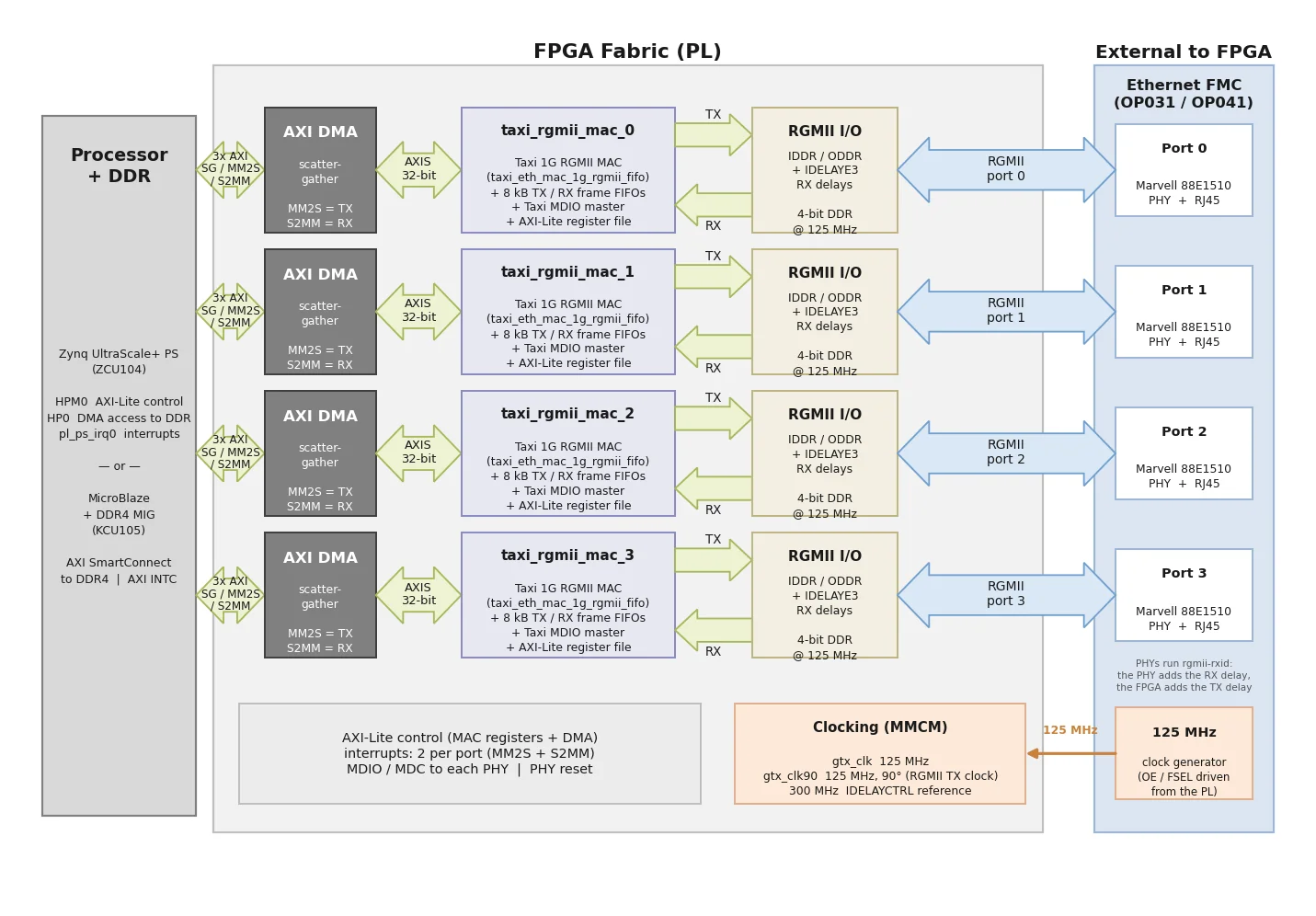
A clocking wizard takes the 125 MHz reference clock from the Ethernet FMC and makes the 125 MHz
RGMII transmit clock, a 90-degree copy of it for the RGMII TX clock output, and a 300 MHz reference
for the IDELAYCTRL that calibrates the receive-side input delays. The PHYs run in rgmii-rxid
mode, which means the PHY adds the receive clock delay and the FPGA adds the transmit clock delay.
There are two block designs that share the same per-port Ethernet logic:
M_AXI_HPM0_FPD carries
the AXI-Lite control path, S_AXI_HP0_FPD gives the DMAs access to DDR, and TTC0 on EMIO is the
lwIP tick timer.At the time of writing, the design supports these two boards, both built with Vivado 2025.2:
| Target design | Board | FMC Connector | Ports | Standalone echo server | Yocto Linux | Vivado Edition |
|---|---|---|---|---|---|---|
zcu104 | AMD Zynq UltraScale+ ZCU104 | LPC | 4 | Yes | Yes | Standard (free) |
kcu105 | AMD Kintex UltraScale KCU105 | HPC | 4 | Yes | No | Enterprise |
Both boards take the 1.8V versions of the cards: Ethernet FMC (OP031-1V8) or Robust Ethernet FMC (OP041-1V8). The KCU105 target is standalone only: there’s no boot device in the design, so the bitstream and the echo server ELF are loaded over JTAG. The design itself doesn’t use any gigabit transceivers (the PHYs connect over RGMII on the LA pairs), so it only needs an LPC connector, and porting it to other boards is mostly a matter of pin constraints and RGMII receive timing (see the lessons learned below).
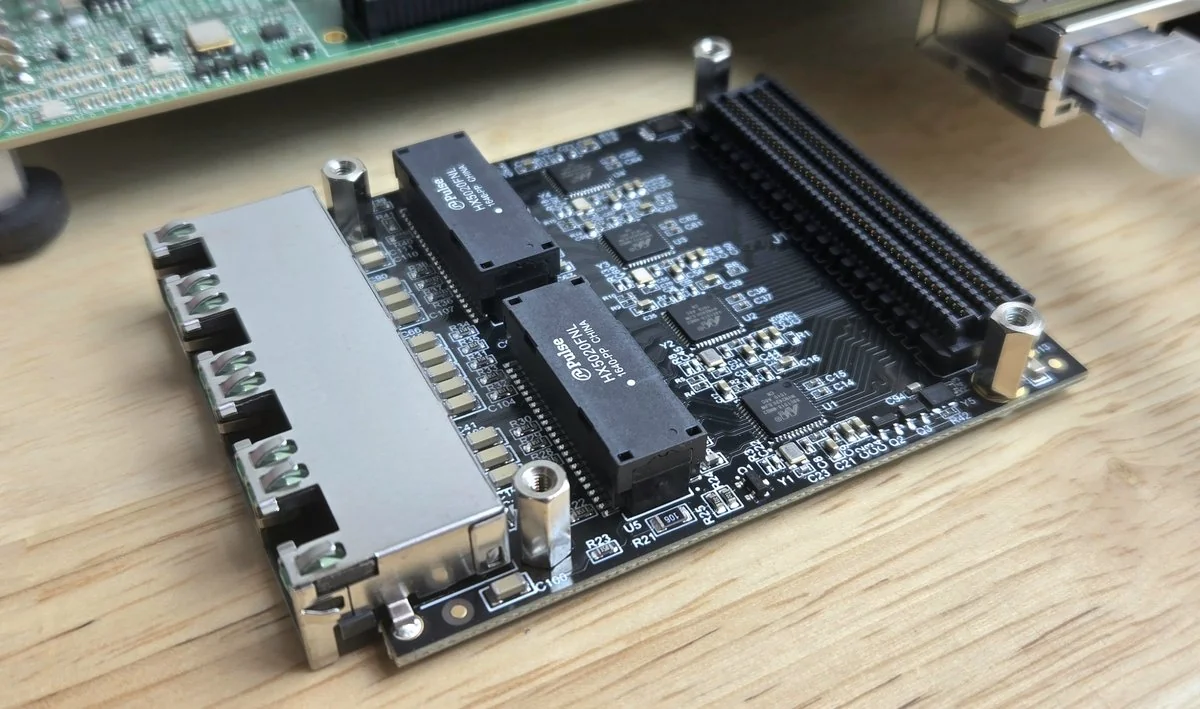
Above is the Robust Ethernet FMC. It has the same PHYs and the same FMC pinout as the Ethernet FMC, but a different RJ45 connector and discrete magnetics, which make it mechanically compatible with more carrier boards. Because the pinout is the same, the two cards are interchangeable with this design.
The standalone application runs an lwIP TCP echo server on all four ports at the same time,
each with its own IP address. The AMD lwIP port has no network interface driver for the Taxi MAC,
so the repo provides one (Vitis/common/src/taxi_macif.c), which manages the AXI DMA
scatter-gather rings, sets up the PHY over MDIO and polls the link. Each port runs a DHCP client and
falls back to a static address (192.168.1.10 + port number) if it doesn’t get a lease within
10 seconds. This is the UART output of the ZCU104 with port 0 cabled to a router running a DHCP
server:
----- Ethernet FMC Taxi MAC lwIP echo server (4 ports) -----
MAC: Taxi 1G RGMII (taxi_rgmii_mac) + AXI DMA SG, PHY: Marvell 88E1510
Addressing: DHCP per port, static 192.168.1.10+N fallback after 10 s
Port 0: MAC 00:0A:35:06:21:05
Port 1: MAC 00:0A:35:06:21:06
Port 2: MAC 00:0A:35:06:21:07
Port 3: MAC 00:0A:35:06:21:08
Waiting up to 5000 ms for autonegotiation...
Port 0: link up, 1000 Mbps full duplex (MAC in-band status: 1000 Mbps)
Port 0: DHCP started
-----lwIP TCP echo server ------
TCP packets sent to port 7 will be echoed back
TCP echo server started @ port 7
Port 0: IP 192.168.2.125 mask 255.255.255.0 gw 192.168.2.1 (DHCP)On the ZCU104, the design also builds an embedded Linux image with AMD’s Yocto / Embedded
Development Framework (EDF) 2025.2, the successor to PetaLinux. The four ports come up as ordinary
Linux network interfaces through taxi_mac, an out-of-tree network driver that’s included in the
repo (Linux/taxi-mac). It drives the Taxi MAC registers, hands the PHYs to the kernel’s phylib,
and moves frames through the AXI DMAs using the kernel’s dmaengine API. Receive uses NAPI with GRO,
and with that we measured 934 Mb/s receive and 940 Mb/s transmit on a port. The image also
includes ethtool, iperf3, phytool and a self-test called taxi-eth-test which finds the
ports, reports link state and counters, gets a DHCP lease and pings the gateway on every port that
has a cable, then prints VERDICT: PASS or VERDICT: FAIL.
Two limitations to be aware of: the Taxi MAC has no checksum, segmentation or VLAN offload, and no address filter, so every frame on the wire crosses the DMA and gets filtered by the kernel. On a busy network you’ll see higher CPU load per packet than with a MAC that filters in hardware.
| ethernet-fmc-axi-eth | ethernet-fmc-zynq-gem | ethernet-fmc-taxi-eth | |
|---|---|---|---|
| MAC | AMD AXI 1G/2.5G Ethernet Subsystem | Zynq / Zynq UltraScale+ PS GEMs (via EMIO) | Taxi 1G RGMII MAC (open source) |
| MAC source code | No | No (hard IP) | Yes |
| IP license needed for the MAC | Yes | No | No |
| Processors | MicroBlaze, Zynq, Zynq UltraScale+, Versal | Zynq, Zynq UltraScale+ | MicroBlaze, Zynq UltraScale+ |
| Number of supported boards | Many | Many | ZCU104, KCU105 (so far) |
If you need the widest board support or the most mature Linux support today, the AXI Ethernet and PS GEM designs are still the safest choices. If you want to see and own every gate between the PHY and memory, this is the one to start from.
Bringing this design up was a good education in what the AXI Ethernet Subsystem normally takes care of for you. The design notes in the user guide record everything that cost us real time, but here are a few highlights that are useful well beyond this design:
USER_CLOCK_ROOT and CLOCK_LOW_FANOUT, and adding one IDELAYE3 per
data pin, tuned per port. On the ZCU104 every port now meets setup with at least +0.37 ns and hold
with at least +0.5 ns of margin.foreach. Vivado drops the block with a critical warning and the
constraints inside never apply. Our first implementation ran with no RGMII input delays because of
this.inout with an inferred tristate lost its input buffer. Every MDIO read returned
0x0000 with no warning. An explicit IOBUF primitive fixed it.ip link set up ended in a TX timeout.
The taxi_mac driver now requests and releases its DMA channels on every open and close.The design needs Vivado and Vitis 2025.2, and for the Linux image, a Linux machine (we use Ubuntu 22.04 and 24.04). Clone the repo with its submodules, because the Vivado build can’t find the Taxi sources without them:
git clone --recursive https://github.com/fpgadeveloper/ethernet-fmc-taxi-eth.git
cd ethernet-fmc-taxi-eth
Then build everything that your target supports with the build runner (build.sh on Linux,
build.bat on Windows). It finds the AMD tools by itself, and each stage builds whatever it depends
on:
./build.sh all --target zcu104The boot files for the standalone application end up in Vitis/boot/<target>/, and the Yocto
output (including the SD card image rootfs.wic.xz) ends up in Yocto/<target>/images/linux/. The
user guide has the full instructions, including how to prepare the SD card and how to load the
KCU105 over JTAG.
Here are the links you’ll need:
A big thank you to Alex for making his work available to all of us. I hope you find this design useful, and if you port it to another board, please send us a pull request. If you have any questions, feel free to reach out.