Title here
Summary here


Our new FPGA Drive reference design hands the NVMe I/O to the AMD NVMe Host Accelerator
October 29, 202619 minutes
One of the most exciting things about working with AI tools today is that they make it easy to use all the features and reach the full potential of FPGAs and related devices: not just the fabric, but also the GPUs, the video codec units (VCUs), the AI Engines, the high-throughput interfaces and the interconnects. The project I’m writing about here is one example: Claude Code helped me build a record and playback engine with the NVMe I/O offloaded to the FPGA fabric. We built it up gradually, testing it on real hardware on the bench and knocking out one bottleneck after another, until the only remaining bottlenecks were limitations of the hardware itself (the SSDs, the DDR interface, etc). Later in the post, I share some details about how my “Claude Code” bench is set up.
Like the FPGA Drive Recorder that I wrote about two weeks ago, our new reference design, FPGA Drive NVMe Offload, records a data stream from the FPGA fabric to one or two NVMe SSDs and plays recordings back into the fabric. The difference is that this one does real NVMe offload. The fabric builds the NVMe commands itself, the AMD NVMe Host Accelerator IP (PG328) queues them and rings the SSDs' doorbells, and the SSDs move the data to and from memory on their own. The CPU isn’t in the data path at all. On the AMD Versal AI Core VCK190, with two Sandisk WD_BLACK SN8100 SSDs on our FPGA Drive FMC Gen4 (OP063), it records at 13.75 GB/s and plays back at 14.25 GB/s.
This post covers how we got here, what the design does, the results, and what it costs you (there’s a licensed IP in it). For the fine detail (register map, driver, every benchmark run) see the user guide.
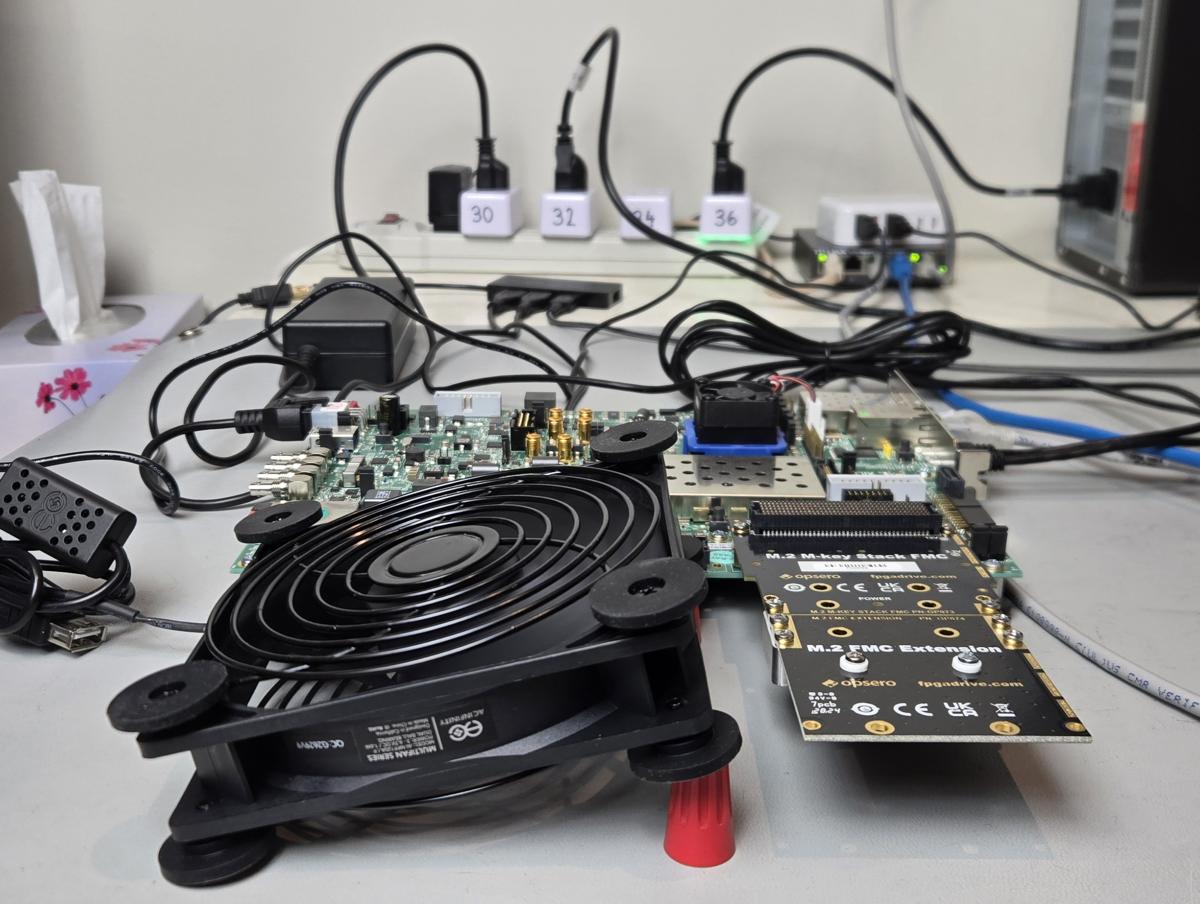
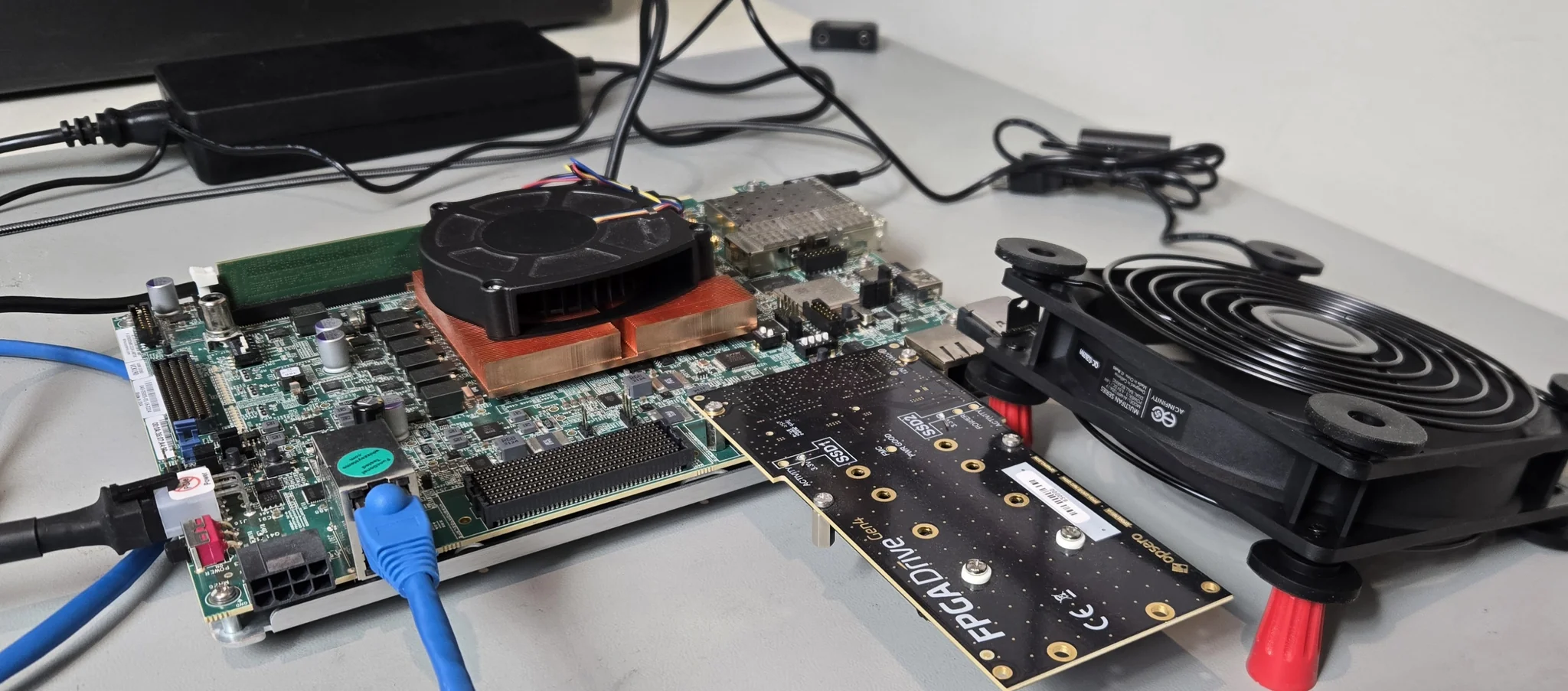
The photo below shows the setup behind those numbers: the VCK190 with the FPGA Drive FMC Gen4 on FMCP1. The two Sandisk WD_BLACK SN8100 SSDs are mounted on the underside of the card, so you can’t see them in the photo, and the fan keeps them cool during the long recordings.
When we started on the FPGA Drive Recorder, my expectations weren’t very high. Linux owns the SSDs in that design and the CPU handles every buffer, so I figured we’d be lucky to get a few GB/s. We designed the test pattern source and the checker sink with a 128-bit datapath at 200 MHz, which is a maximum of 3.2 GB/s, and I thought that would be plenty.
It wasn’t. Once we fixed a few problems, the RAID0 pairs were recording at exactly 3.2 GB/s on both boards, so the bottleneck was our own source. We widened the datapath to 256 bits at 250 MHz (8 GB/s) and kept going, and every time we removed one limit we found the next one. The commit history of fpga-drive-recorder tells the story, but here are the main ones:
After all that, the recorder hit the limit that no amount of tuning was going to fix: the CPU.
Even with zero-copy buffers, every write goes through io_uring, the filesystem, the block layer
and the NVMe driver. At the top RAID0 rates, fdrec was using a whole core or more: 97-98 % of
a Cortex-A72 core at 6.5 GB/s on the VCK190, and 116-117 % of a Cortex-A53 core at 5 GB/s on the
ZCU106. Playback was worse, because fdplay reads with a single thread, and that thread capped
RAID0 playback at 5.5-6 GB/s on the VCK190. A recorder that needs the whole processor isn’t
much use if your application needs the processor too.
So the obvious next step was to take the CPU out of the data path. I went looking for a way to do that with AMD IP, and found the NVMe Host Accelerator. It’s an AMD IP core that manages the NVMe submission and completion queues in hardware: the fabric gives it 64-byte NVMe commands over AXI4-Stream, it stores them in the queues and rings the SSD’s doorbell, and it passes the completions back to the fabric. That’s exactly the piece we were missing.
The first release of the offload design reused the recorder’s 3.2 GB/s source (same lesson, learned twice), so the next release widened it: 256 bits on Zynq UltraScale+ (8 GB/s) and 512 bits on Versal (16 GB/s), with one NoC port per PCIe Root Port on the VCK190. With two Samsung 980 PRO 1TB on the VCK190, that release recorded RAID0 at 9.25 GB/s and played back at 8.75 GB/s, and the CPU barely noticed.
The next wall was memory. The ring of buffers lived in the PS DDR4, and every byte crosses that memory twice: once when the fabric writes it, and once when the SSD reads it (or the other way around for playback). One DDR4 controller couldn’t carry both directions at those rates. The fix was to split the ring over two memories, so that each SSD of the RAID0 pair gets a memory of its own: on the VCK190 the second memory is the board’s LPDDR4, and on the ZCU106 it’s the soldered PL DDR4. Linux doesn’t use the second memory at all; only the fabric and the SSDs can reach it. With the split ring, the 980 PRO pair on the VCK190 recorded at 10 GB/s, which is those drives’ own write rate, and played back at 11 GB/s.
One lesson from that step: on the VCK190 I expected to interleave ring B over both of the board’s LPDDR4 controllers, but that capped the writes at 1.8-2.0 GB/s per NoC master. The NoC orders writes strictly, so each 128-byte piece waited for a round trip. Putting ring B behind one LPDDR4 controller (its two x32 channels interleave internally) fixed it.
The split ring has a catch: it needs a board with a second memory that’s wide enough. The UltraZed-EV has only a 16-bit PL DDR4, which is too narrow for half of the stream, so its design keeps a single ring in PS DDR.
Now the drives were the limit. The 980 PRO pair recorded at its own write rate, and the Sabrent Rocket 2230 pair recorded (8.25 GB/s) and played back (9.25 GB/s) at its own rates. But none of these Gen4 drives was filling its Gen4 x4 link, and I had a suspicion that the newer PCIe Gen5 SSDs would. Most Gen5 drives are rated well above what a Gen4 x4 link can carry, so on a Gen4 Root Port they should run at the link’s full rate. I bought a pair of Sandisk WD_BLACK SN8100 HS 1000GB (Gen5 x4 drives, linked at Gen4 x4 on the VCK190), and that’s exactly what they did. One drive records at 6.75 GB/s and plays back at 7 GB/s, and the pair records at 13.75 GB/s. Setting PCIe MaxPayload from 256 down to 128 bytes costs the pair 9.5 % of its write rate, which is the extra TLP overhead of smaller packets. A flash limit wouldn’t show that, so it’s clearly the link.
The faster drives also showed us one more limit. With the default layout, where each SSD’s
chunks sit in one memory, playback still stopped at 11 GB/s, with the 980 PROs and the SN8100s
alike. During playback, the memory being read carries the stream at the full rate and half of
the SSDs’ writes, about 18 GB/s of mixed traffic, and that’s where it tops out. Striping the ring
over the two memories every 4 KB (--stripe 4) shares the reads and writes evenly between both
memories, and the SN8100 pair then plays back at 14.25 GB/s, the full read rate of its two
Gen4 x4 links. The 980 PROs don’t like 4 KB stripes (they get slower), so the stripe is a choice
you make for your drives, and whole-chunk stripes stay the default.
My goal for all of this was at least 12 GB/s of playback. The reason is a project I want to build: a 100 Gbps Ethernet packet replay jig, based on the VCK190 and our new 2x QSFP28 FMC (OP120). The VCK190 has two FMC+ connectors, so the FPGA Drive FMC Gen4 goes on FMCP1 and the 2x QSFP28 FMC on FMCP2. A 100G link carries 12.5 GB/s on the wire, and a little less than that in frame data once you take out the preamble and the inter-frame gap. 14.25 GB/s of playback covers it with some headroom. Goal reached.
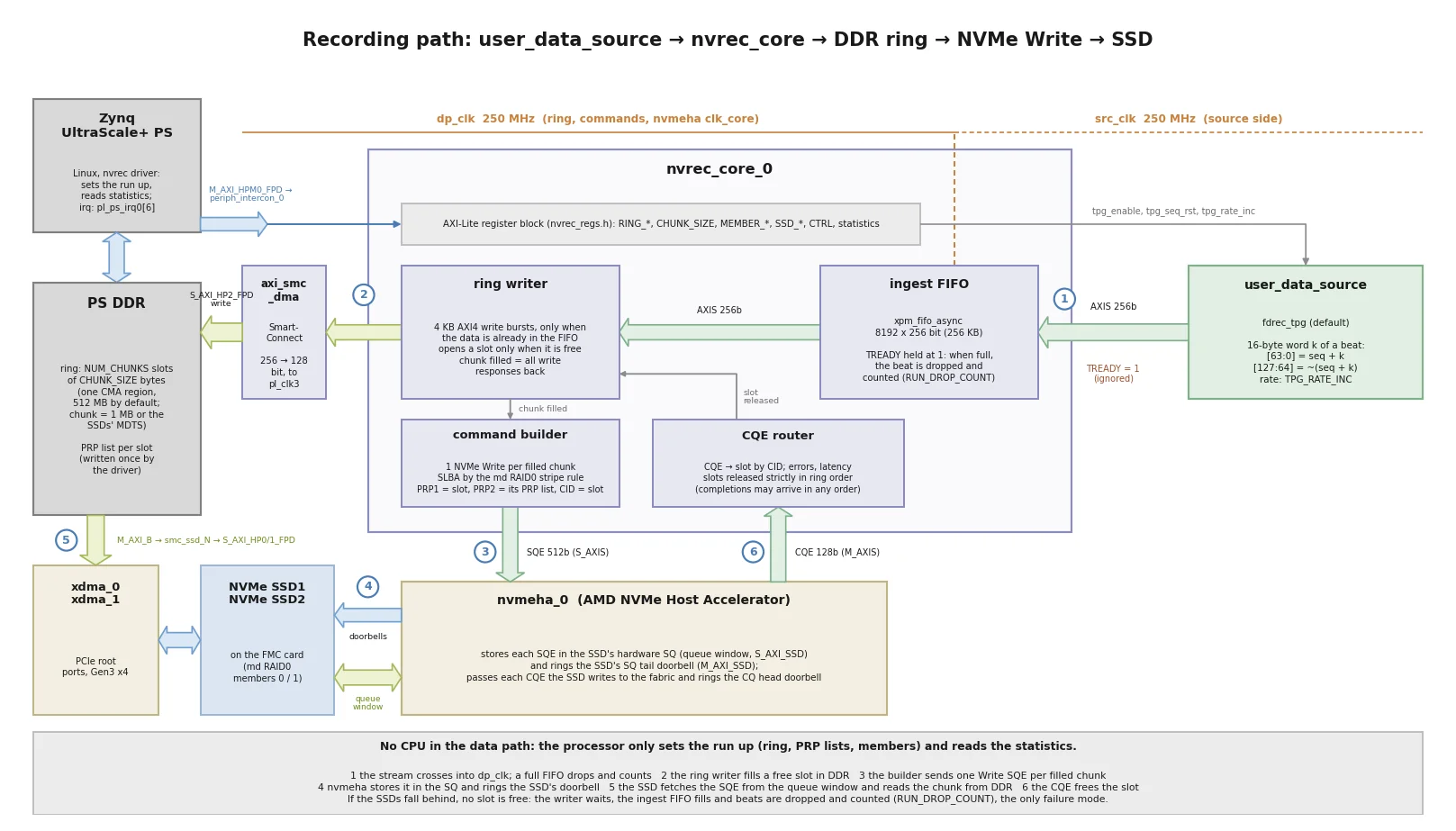
The recording path works like this (the playback path is the same in reverse):
user_data_source, streams into an ingest FIFO. In the reference design
it’s a test pattern generator that models an ADC: it runs at a programmable rate and
can’t be stalled. That’s where your own ADC, sensor or processing logic goes.nvrec_core makes a 64-byte NVMe Write command
and hands it to the NVMe Host Accelerator.With two SSDs, the chunks are striped in the Linux md RAID0 layout, so you can also assemble the
array with mdadm on a PC. If the SSDs fall behind and the ring fills up, beats are dropped and
counted. That’s the only way the design can fail, and a valid recording has a drop count of zero.
The image below shows the recording path of the Zynq UltraScale+ version.
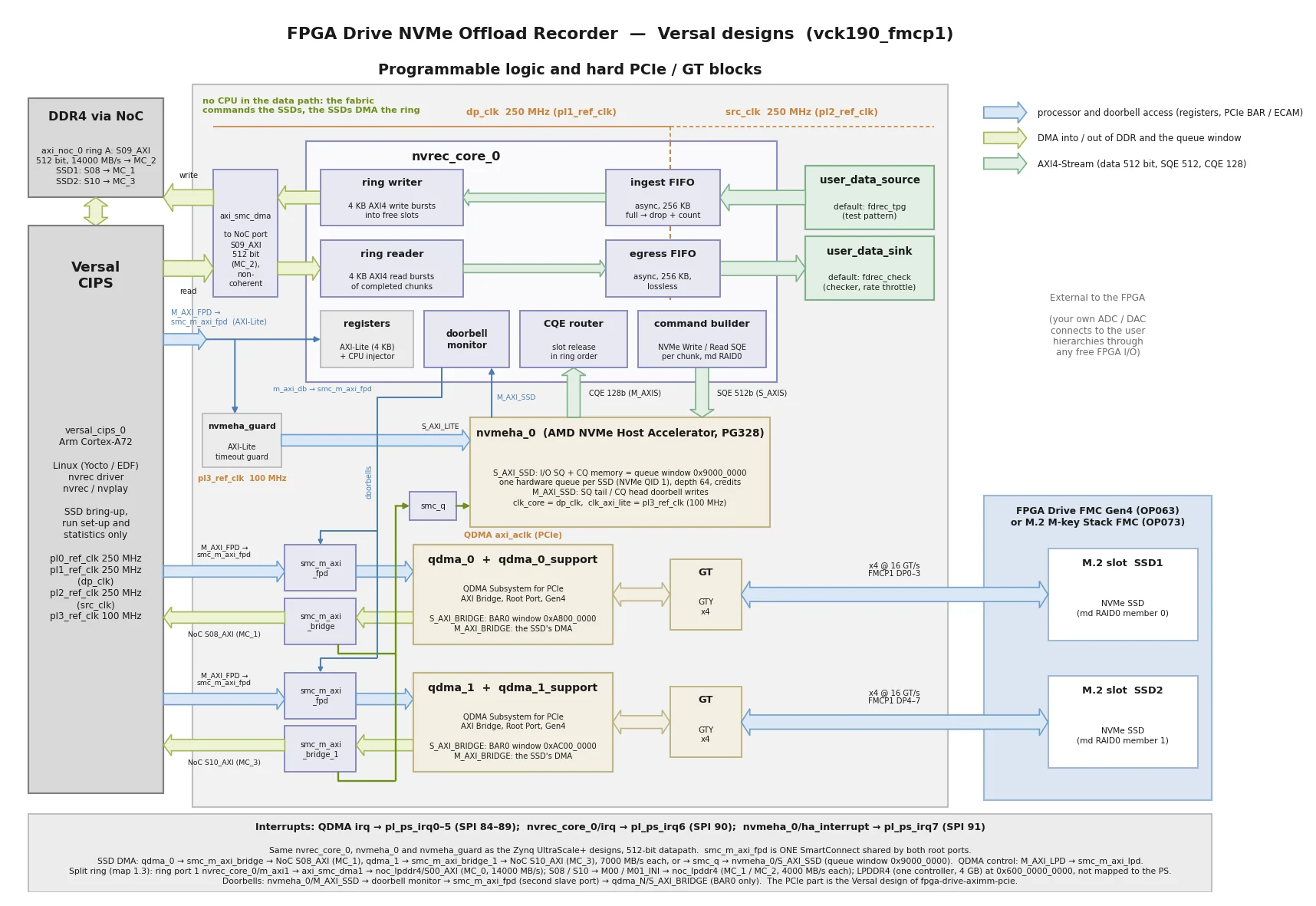
The image below shows the whole Versal design (vck190_fmcp1), with its 512-bit datapath, the
ring’s two NoC ports (DDR4 and LPDDR4) and one QDMA PCIe Root Port (Gen4 x4) per M.2 slot.
The design still runs Linux (Yocto / EDF 2025.2), but Linux isn’t in the data path:
nvrec.ko (the stock nvme driver
doesn’t touch them), creates the I/O queues in the Host Accelerator, prepares the filesystem
and the recording file, starts the run and reads statistics until it’s over.Recordings are ordinary files on an exFAT volume, so you can copy them off the board with scp.
Each recording is one contiguous file that’s preallocated before the run, and the volume is
unmounted while the hardware is writing to it. The SSDs also appear as block devices
(/dev/nvrec0n1, /dev/nvrec1n1) through a small command injector in the fabric, which is how
Linux gets to the filesystem.
The design uses the same user_data_source and user_data_sink insertion points and the same
test pattern as fpga-drive-recorder, so if you’ve already built something on the recorder, it
moves across. The one difference is the stream width: 256 bits on Zynq UltraScale+, and 512 bits
on Versal.
The Linux image comes with these tools:
| Tool | What it does |
|---|---|
nvsetup-raid0.sh | Prepares the recording volume (one SSD, or md RAID0 across two), exFAT at /mnt/rec |
nvrec | Records the fabric stream to a file |
nvplay | Plays a recording back into the fabric |
nvverify | Checks every 16-byte word of a test-pattern recording (also builds on a PC) |
nvbench.sh | Sweeps the recording rate to find what your SSDs can sustain |
nvrec-mps | Shows and sets the PCIe MaxPayload of the Root Ports and SSDs |
All figures are in MB/s and were measured on hardware in October 2026, with the image defaults (MaxPayload 256 bytes, 32 commands in flight per SSD, a 1 GB split ring for RAID0). Recording rates are the highest rate that recorded 32 GB with zero dropped beats in 3 runs out of 3, and playback rates are sustained from a 40 GiB file with no underflow. On the VCK190 the drives link at Gen4 x4; on the ZCU106 they link at Gen3 x4. For comparison, the last column is the best that the Linux-driven FPGA Drive Recorder did with the same drives on the same board.
| Board | SSDs (RAID0 pair) | Recording | Playback | Recorder (rec / play) |
|---|---|---|---|---|
| VCK190 | 2x WD_BLACK SN8100 HS 1000GB | 13 750 | 14 250 (--stripe 4); 11 000 with the default stripe | not measured |
| VCK190 | 2x Samsung 980 PRO 1TB | 10 000 | 11 000 | 6500 / 6000 |
| VCK190 | 2x Sabrent Rocket 2230 1TB | 8250 | 9250 | 4000 (7000 with a bigger ring) / 5500 |
| ZCU106 | 2x Samsung 980 PRO 1TB | 6000 | 5750 | 4500 (5000 with a bigger ring) / 4000 |
| ZCU106 | 2x Sabrent Rocket 2230 1TB | 6000 | 6000 | 3500 (4500 with a bigger ring) / 3500 |
And the CPU: at those rates nvrec uses 2.3-3.7 % of one Cortex-A72 core and nvplay
6.3-8.1 %, compared with 60-120 % of a core for the recorder’s apps. That cost doesn’t grow
with the rate either, because the CPU doesn’t touch any of the data.
A few points about these results:
The benchmarks page has every run, a table of every ceiling we found with what sets it, and the method. The comparison page compares this design with the recorder line by line.
You can get an evaluation license from the AMD licensing site,
xilinx.com/getlicense (search for NVMe Host Accelerator).
The evaluation timeout is fine for trying the design out, and we did all of our benchmarking
that way, but a single recording can’t outlast the time that’s left. We added an AXI-Lite
timeout guard in front of the IP, so that when the evaluation core stops, nvrec and nvplay
report it (“Host Accelerator stopped responding (evaluation license expired?)”, exit code 5)
instead of hanging the processor. For a product, you need a purchased license.
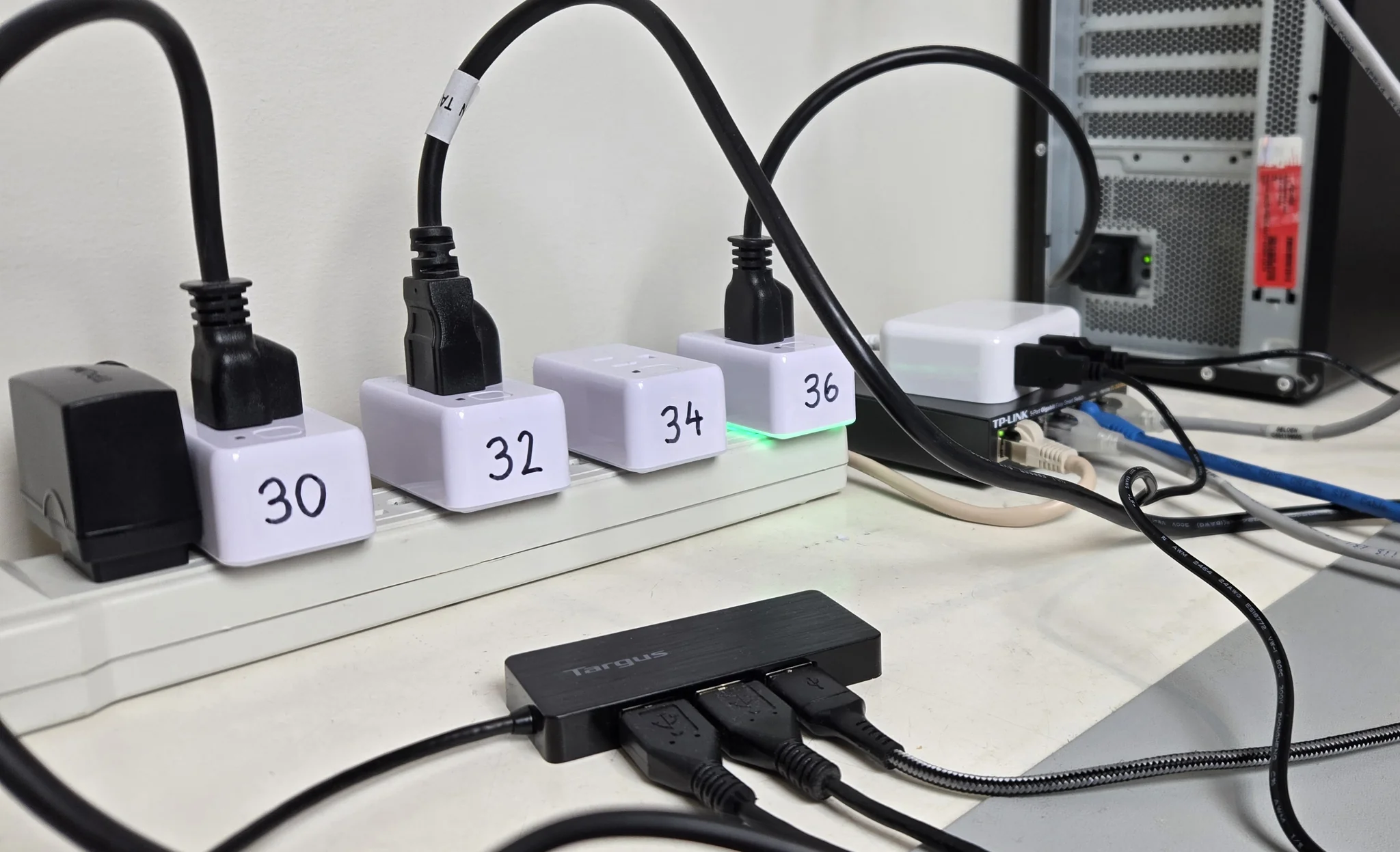
Because an evaluation bitstream needs a power cycle every three hours, the benchmarks were a good job for the automated bench that I described in my Claude Code for FPGA post. Claude Code drives the whole bench from my main dev machine, and the photo below shows the parts that make that work:
The machine in the top right of the photo is a host with an NVIDIA GPU and a ConnectX-6 NIC, which I’m using to build an RDMA demo. Claude Code drives that one from the main dev machine too.
That’s the main trade-off compared with the recorder. Here’s how I’d choose between them:
In the recorder post, I pointed readers who need complete NVMe offload to the NVMe Streamer IP core from our partner Missing Link Electronics, and that’s still an option worth looking at.
Some SSDs won’t work with this design. The Host Accelerator assumes a 4-byte doorbell stride
(CAP.DSTRD = 0) and needs the SSD’s BAR0 below 4 GB, and the driver refuses a drive that
doesn’t meet those requirements. See
supported SSDs for the full list
of requirements and the drives that we’ve tested.
At the time of writing, the design supports these target boards:
| Target board | Target design | FMC connector | M.2 slots (PCIe lanes) | Second memory (split ring) | Vivado edition |
|---|---|---|---|---|---|
| UltraZed-EV Carrier | uzev | HPC | 2x Gen3 x4 | none (single ring in PS DDR) | Standard (free) |
| AMD Zynq UltraScale+ ZCU106 | zcu106_hpc0 | HPC0 | 2x Gen3 x4 | PL DDR4 | Standard (free) |
| AMD Versal AI Core VCK190 | vck190_fmcp1 | FMCP1 | 2x Gen4 x4 | LPDDR4 | Enterprise |
Every target also needs the NVMe Host Accelerator license, and the VCK190 needs a Vivado
Enterprise license for its device. The zcu106_hpc0 and vck190_fmcp1 targets have been
tested on hardware in this release. The uzev target is built, but it hasn’t been tested on
hardware in this release (the first release ran on it).
sdtgen/xsct for the Yocto flow)There’s no PetaLinux flow and no bare-metal application.
Install the NVMe Host Accelerator license first, then clone the repo and build everything for
your target. The example below is for the VCK190; use zcu106_hpc0 or uzev for the other
boards. This builds the Vivado project and XSA, then the Yocto image, and puts the boot files in
bootimages/:
git clone https://github.com/fpgadeveloper/fpga-drive-nvme-offload.git
cd fpga-drive-nvme-offload
./build.sh all --target vck190_fmcp1
Flash Yocto/vck190_fmcp1/images/linux/rootfs.wic.xz to the SD card, copy BOOT.BIN onto its
first (FAT) partition, and boot the board with one or two SSDs on the mezzanine card. Log in as
amd-edf (you choose the password on the first login). If you’re using an evaluation license,
remember that the clock starts at power-on. Then:
# 1. Make the recording volume -- ERASES THE DRIVES.
#    Both M.2 slots populated: md RAID0 across the two SSDs, exFAT, mounted at /mnt/rec
sudo nvsetup-raid0.sh
#    or a single SSD:
sudo nvsetup-raid0.sh --single /dev/nvrec0n1

# 2. Record 10 GB of the test pattern at 1 GB/s
#    (exit code 0 = no dropped beats and no NVMe errors)
sudo nvrec --rate 1000MB --size 10G /mnt/rec/test.dat

# 3. Verify every word of the recording
sudo nvverify /mnt/rec/test.dat

# 4. Play it back into the fabric, where the hardware checker consumes it at 1 GB/s
sudo nvplay --rate 1000MB /mnt/rec/test.dat

# Sweep the recording rate to find what your SSD(s) can sustain: 32 GB per step
sudo nvbench.sh
To copy a recording off the board, use scp amd-edf@<board-ip>:/mnt/rec/test.dat . from your
PC. The test procedure in the user
guide shows the expected output of each step. To record your own data, replace the test pattern
generator in user_data_source (see
custom data source), and for
playback into your own logic, such as a DAC, replace the checker in user_data_sink (see
custom data sink).
FPGA Drive NVMe Offload takes the CPU out of the NVMe data path, and that takes RAID0 recording and playback up to what the SSDs and their links can do: 13.75 GB/s recording and 14.25 GB/s playback on the VCK190 with two WD_BLACK SN8100. It needs a licensed AMD IP and its own Linux driver, so it doesn’t replace the FPGA Drive Recorder, but it’s there for the applications that need more than Linux can sustain.
Next up for me is the 100G Ethernet packet replay jig on the VCK190 and the 2x QSFP28 FMC, and I’ll write about it when it’s working.
If you test it with SSDs that aren’t on our list, I’d really like to hear how they do. And if you have any questions, feel free to reach out.