Title here
Summary here


On Ubuntu 20.04
May 11, 20234 minutes
While getting into the Kria KV260 Vision AI Starter Kit Applications I’ve had to install Vitis and PetaLinux 2022.1 on Ubuntu 20.04. In this post I just want to write out some clear instructions to make it a smoother process for others that need to do the same thing.
It’s probably best to start by installing all of the dependencies of Vitis and PetaLinux 2022.1. Just open
a terminal in Ubuntu by pressing Ctrl + Alt + T and run the following commands.
Install the Vitis 2022.1 dependencies:
sudo apt-get install libstdc++6:i386
sudo apt-get install libgtk2.0-0:i386
sudo apt install libtinfo5 libncurses5
sudo ln -s /usr/bin/make /usr/bin/gmake
Install the PetaLinux 2022.1 dependencies:
sudo apt-get install iproute2 \
gawk \
python3 \
python \
build-essential \
gcc \
git \
make \
net-tools \
libncurses5-dev \
tftpd \
zlib1g-dev \
libssl-dev \
flex \
bison \
libselinux1 \
gnupg \
wget \
git-core \
diffstat \
chrpath \
socat \
xterm \
autoconf \
libtool \
tar \
unzip \
texinfo \
zlib1g-dev \
gcc-multilib \
automake \
zlib1g:i386 \
screen \
pax \
gzip \
cpio \
python3-pip \
python3-pexpect \
xz-utils \
debianutils \
iputils-ping \
python3-git \
python3-jinja2 \
libegl1-mesa \
libsdl1.2-dev \
pylint3
Want to know where to get the PetaLinux dependencies for a different version? It can be found in the release notes for the version that you are installing. Just go to the Reference Guide, choose the version that you are using (there is a drop-down selector on the heading bar), then find the link to the release notes. At the bottom of the release notes you will find attachments, one of them being an Excel file containing a list of the dependencies. It also contains a one line command that you can run in a terminal and install all of the dependencies in one go.
Now we download Vitis 2022.1 and then run the installer. I prefer to download the full installer, rather than the “Self Extracting Web Installer”; the reason being is that I often need to install it again on other machines, but this choice wont make a difference for most people.
~/Downloads directory then we need to make the Xilinx_Unified_2022.1_0420_0327_Lin64.bin
file executable, and then run it with these commands:chmod +x ~/Downloads/Xilinx_Unified_2022.1_0420_0327_Lin64.bin
~/Downloads/Xilinx_Unified_2022.1_0420_0327_Lin64.bin~/Downloads
directory, we will need to extract the Xilinx_Unified_2022.1_0420_0327.tar.gz file and then execute
the installer with these commands:tar xvzf ~/Downloads/Xilinx_Unified_2022.1_0420_0327.tar.gz -C ~/Downloads/.
cd ~/Downloads/Xilinx_Unified_2022.1_0420_0327/
./xsetup~/Downloads
directory.chmod +x ~/Downloads/petalinux-v2022.1-04191534-installer.runmkdir -p ~/petalinux/2022.1
~/Downloads/petalinux-v2022.1-04191534-installer.run -d ~/petalinux/2022.1Note that I’m installing PetaLinux into the “home” directory. This is because the Reference Guide specifies that “PetaLinux tools need to be installed as a non-root user”.
q to
close the agreement, then press y to accept the agreement.PetaLinux tools require that your host system /bin/sh be bash, which in Ubuntu it is dash.
sudo dpkg-reconfigure dash.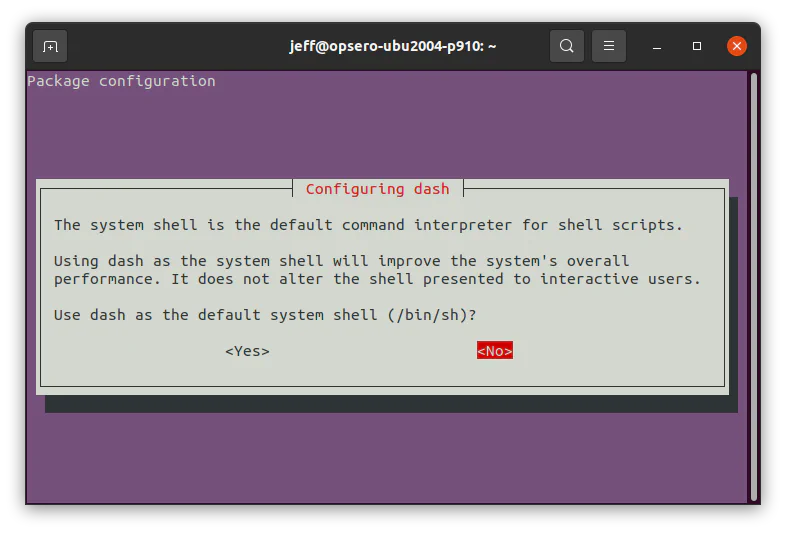
Make sure that you can source PetaLinux by running source ~/petalinux/2020.1/settings.sh.
If all is good you can go ahead and delete the installers
for Vitis and PetaLinux (that will free up about 40GB, so it’s worth it!):
rm ~/Downloads/Xilinx_Unified_2022.1_0420_0327*
rm -r ~/Downloads/Xilinx_Unified_2022.1_0420_0327/
rm ~/Downloads/petalinux-v2022.1-04191534-installer.run