List of PYNQ projects and ports

List of PYNQ projects and ports

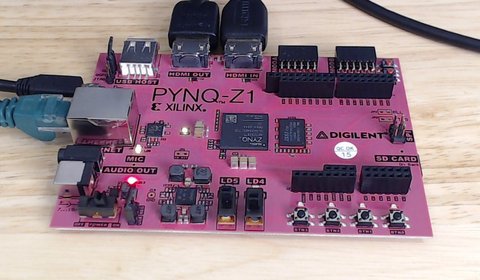
PYNQ enables huge productivity gains by making it possible to program the Zynq-7000 SoC with a high-level programming language (Python) and leverage the power of FPGA hardware acceleration with ease. Xilinx first designed PYNQ to target the PYNQ-Z1 board but it wasn’t long before others saw the potential of running PYNQ on other platforms. This post is a list of open-sourced PYNQ projects and ports that run on other platforms. I’ll keep the list up-to-date but if you know of an open-sourced PYNQ project or port that I haven’t found yet, please let me know and I’ll add it to the list.

[Read More]
pynq 

PYNQ Computer Vision demo: 2D filter and dilate

See what the PYNQ-Z1 and the PYNQ Computer Vision overlay are capable of doing with a 720p standard HD video stream. In the video we run a 2D filter and dilate function on the incoming video, first using the Python OpenCV functions (ie. without hardware acceleration), then we test it again with the accelerator IPs running on the FPGA. Without acceleration, we get a frame rate of 5 frames per second. At that frame rate the flicker is obvious. When we switch to the hardware accelerated functions, we get 60 frames per second and we see a very smooth video output.

[Read More]
pynq 

How to accelerate a Python function with PYNQ

This video demonstrates how you would typically go about accelerating a Python function or algorithm on the Zynq-7000 with PYNQ. The function I chose to base this video on is the Finite Impulse Response (FIR) filter because the SciPy package contains the lfilter function which can be used for this purpose, and because the Xilinx IP catalog has a free FIR filter IP core. If you instead wanted to implement the accelerator in HLS, the process would be very similar, you would just have to design your accelerator with AXI-Streaming interfaces and ensure that the TLAST signals were properly managed.

[Read More]

Create a custom PYNQ overlay for PYNQ-Z1

In this video tutorial we create a custom PYNQ overlay for the PYNQ-Z1 board. Probably the simplest PYNQ overlay possible, it contains one custom IP (an adder) with an AXI-Lite interface and three registers accessible over that interface: a, b and c. To use the IP we write a number to input registers a and b, and then we read the output register c which contains the sum of a and b. We create the IP in Vivado HLS, we then create the overlay in Vivado and bring the IP into our block design. Then we copy the overlay files (.bit and .tcl) over the network and onto the SD card of the PYNQ-Z1 board. Finally we open the Jupyter web application from a web browser and we write some Python code to test out our overlay and custom IP.

[Read More]

Python for the Zynq and the PYNQ-Z1

Being a big fan of Python, for ages I’ve wanted to explore the possibilities of running Python on the Zynq. Thankfully Xilinx and Digilent saw the value in this too and they developed the PYNQ-Z1 and more importantly the PYNQ libraries for Python. The PYNQ-Z1 is basically a single board computer based on the Zynq-7020 device from Xilinx. So thats got a dual core ARM plus integrated FPGA or programmable logic. The board runs Ubuntu Linux, it’s got Python installed and it has a file system on the micro SD card. The board’s got Gigabit Ethernet so you can connect this to your network and to the Internet. That’s useful for adding packages to Linux and the like but we also use the network interface to develop and run Python applications on the board. You see, the board runs the Jupyter web application. Jupyter allows us to program and run Python scripts through a web interface using a web browser (see screenshot below). This is pretty handy when you’re developing code for a single board computer because you typically don’t have a screen. With Jupyter, you’ve got an interactive web interface, so it’s got features like code completion, you can step through code blocks, display images and heaps of other things.

[Read More]
pynq