NVMe SSD Speed test on the ZCU106 Zynq Ultrascale+ in PetaLinux

NVMe SSD Speed test on the ZCU106 Zynq Ultrascale+ in PetaLinux

Update 2020-02-07: Missing Link Electronics has released their NVMe Streamer product for NVMe offload to the FPGA, maximum SSD performance, and they have an example design that works with FPGA Drive FMC!

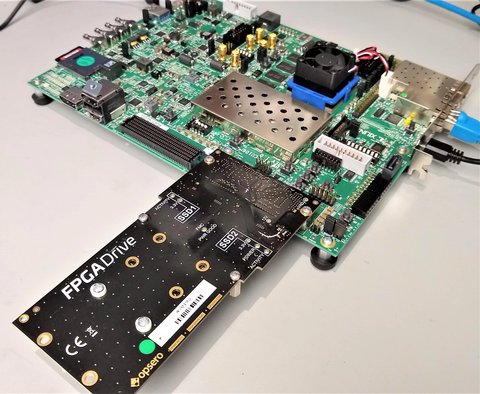
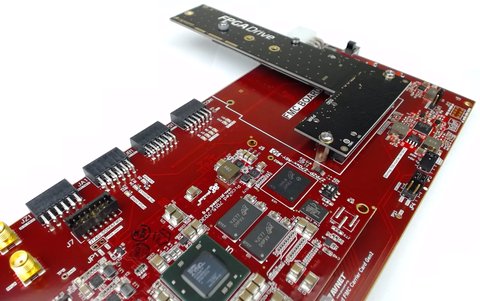
Probably the most common question that I receive about our SSD-to-FPGA solution is: what are the maximum achievable read/write speeds? A complete answer to this question would require a whole other post, but instead for today I’m going to show you what speeds we can get with a simple but highly flexible setup that doesn’t use any paid IP. I’ve run some simple Linux scripts on this hardware to measure the read/write speeds of two Samsung 970 EVO M.2 NVMe SSDs. If you have our FPGA Drive FMC and a ZCU106 board, you will be able to download the boot files and the scripts and run this on your own hardware. Let’s jump first to the results.

[Read More]
nvme 

IntelliProp Demos NVMe Host Accelerator on FPGA Drive

Early this year IntelliProp released a demo video of their NVMe Host Accelerator IP core running on the Intel Arria 10 GX FPGA Development board. As you can see in the video, they are using Opsero’s FPGA Drive product with the PCIe slot connector to interface the NVMe SSD to the FPGA board. They measured an impressive performance of around 2300MBps sequential write speed and 3200MBps sequential read speed. The FPGA Drive adapter was designed to fully handle Gen3 speeds precisely because these high throughputs are only possible with a Gen3 interface (note that M.2 SSDs have a 4-lane PCIe interface).

nvme 

Demo of Intelliprop's NVMe Host Accelerator IP core

I’ve just done a video to demo Intelliprop’s NVMe Host Accelerator IP core on the Xilinx Kintex Ultrascale KCU105 dev board and the Samsung 950 Pro M.2 NVMe SSD. To connect them together I’ve used the FPGA Drive FMC plugged into the HPC connector to give us a 4-lane PCIe Gen3 interface with the SSD. The read/write speeds I got are simply incredible and line up very well with the numbers I wrote about in an earlier post. So here they are:

[Read More]
nvme  ssd 

NVMe Host IP tested on FPGA Drive

NVMe Host IP tested on FPGA Drive

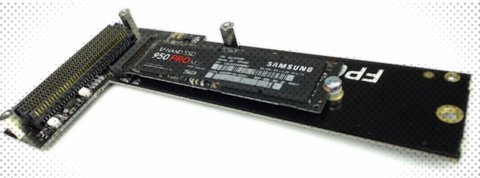
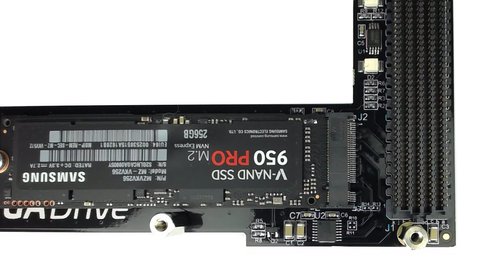
I’ve been totally overloaded with projects in the last couple months but I’m back with some really exciting news today. A few months back a company called IntelliProp, based in Colorado, released a NVMe Host Accelerator IP core for interfacing FPGAs with NVMe SSDs. This IP core allows reads and writes to be performed directly from the FPGA fabric, without the latency overhead of an operating system (read about the NVMe speed tests I did under PetaLinux). IntelliProp has tested their IP core with an FPGA Drive FMC loaded with a Samsung 950 Pro 256GB SSD and here are the results:

[Read More]
nvme 

FPGA Drive now available to purchase

FPGA Drive now available to purchase

Orders can now be placed for the FPGA Drive products on the Opsero website. Both the PCIe and FMC versions allow you to connect an M.2 PCIe solid-state drive to an FPGA development board and both can be purchased at the same price of $249 USD (solid-state drive not included).

The PCIe version has an 8-lane PCIe edge connector for interfacing with the PCIe blade (aka. goldfingers) of an FPGA development board. The board is powered by 12VDC so it comes with a power cable which allows you to power the FPGA Drive from the same power adapter that supplies power to the FPGA board.

[Read More]
nvme 

Micron's new M.2 Solid-State Drive

Micron's new M.2 Solid-State Drive

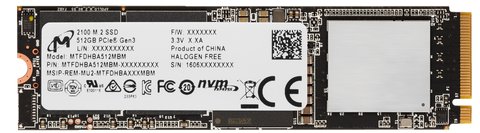
Computer memory giant, Micron, sent me a pre-production sample of their brand new M.2 NVMe solid-state drive. I tested it under PetaLinux on the PicoZed FMC Carrier Card V2 and the FPGA Drive adapter, and as expected, it passed all tests with flying colours. Although all of my previous tests were done with the Samsung VNAND 950 Pro SSD, the FPGA Drive adapter is designed to work with all M.2 PCIe compliant SSDs, and this test is confirmation of that.

[Read More]
nvme 

Measuring the speed of an NVMe PCIe SSD in PetaLinux

With FPGA Drive we can connect an NVM Express SSD to an FPGA, but what kind of real-world read and write speeds can we achieve with an FPGA? The answer is: it depends. The R/W speed of an SSD depends as much on the SSD as it does on the system it’s connected to. If I connect my SSD to a 286, I can’t expect to get the same performance as when it’s connected to a Xeon. And depending on how it’s configured, the FPGA can be performing more like a Xeon or more like a 286. To get the highest performance from the SSD, the FPGA must be a pure hardware design, implementing NVMe protocol in RTL to minimize latency and maximize throughput. But that’s hard work, and not very flexible, which is why most people will opt for the less efficient configuration whereby the FPGA implements a microprocessor running an operating system. In this configuration, we typically wont be able to exploit the full bandwidth of NVMe SSDs because our processor is just not powerful enough.

[Read More]
nvme 

At last! Affordable and fast, non-volatile storage for FPGAs

At last! Affordable and fast, non-volatile storage for FPGAs

Let me introduce you to Opsero’s latest offering: FPGA Drive FMC, a new FPGA Mezzanine Card that allows you to connect an NVMe PCIe solid-state drive to your FPGA.

There’s got to be a better way. In the past, if you were developing an FPGA based product that needed a large amount of fast non-volatile storage, the best solution was to connect a SATA drive. Physical interfacing was pretty simple because all you needed was one gigabit transceiver. The downside however with SATA drives is that they require an IP core to implement the protocol layers between the host processor and the gigabit transceivers. This IP core can cost thousands of dollars and it uses up a lot of the FPGA resources, which all pushes up the total system cost.

[Read More]
nvme  pcie  ssd 

Connecting an SSD to an FPGA running PetaLinux

Connecting an SSD to an FPGA running PetaLinux

This is the final part of a three part tutorial series on creating a PCI Express Root Complex design in Vivado and connecting a PCIe NVMe solid-state drive to an FPGA.

In this final part of the tutorial series, we’ll start by testing our hardware with a stand-alone application that will verify the status of the PCIe link and perform enumeration of the PCIe end-points. We’ll then run PetaLinux on the FPGA and prepare our SSD for use under the operating system. PetaLinux will be built for our custom hardware using the PetaLinux SDK and the Vivado generated hardware description. Using Linux commands, we will then create a partition, a file system and a file on the solid-state drive.

[Read More]
nvme  pcie  ssd  popular 

Zynq PCI Express Root Complex design in Vivado

This is the second part of a three part tutorial series in which we will create a PCI Express Root Complex design in Vivado with the goal of connecting a PCIe NVMe solid-state drive to our FPGA.

In this second part of the tutorial series, we will build a Zynq based design targeting the PicoZed 7Z030 and PicoZed FMC Carrier Card V2. In part 3, we will then test the design on the target hardware by running a stand-alone application which will validate the state of the PCIe link and perform enumeration of the PCIe end-points. We will then run PetaLinux on the FPGA and prepare our SSD for use under the operating system.

[Read More]